

How to Redeem Roblox Gift Cards (2026)

Roblox gift cards are one of the most common ways to add Robux or Roblox Credit to an account. They’re sold at major retailers, delivered as digital codes, and handed out as birthday and holiday gifts, so many players end up holding one without knowing what to do next.
Cards come in different types, and what you get from one changes depending on the card, from Robux to Roblox Credit to a bonus item. In this article, we’ll explore how to redeem a Roblox gift card, how the different card types compare, and what to do when a code doesn’t work.
How to Redeem a Roblox Gift Card
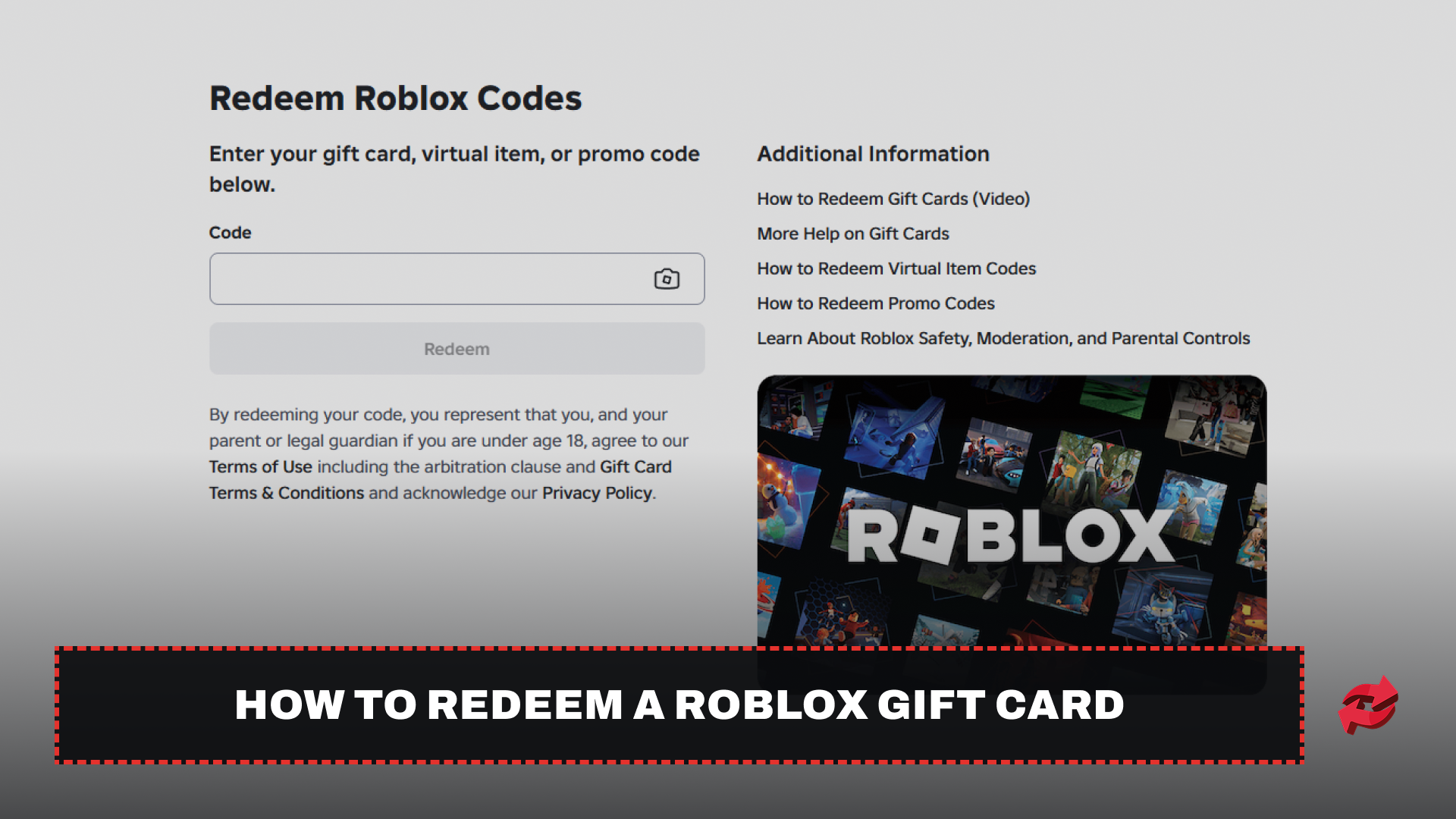
Roblox gift cards are redeemed through a web browser at the official Roblox code redemption page. The same page handles physical cards, e-gift cards, and digital codes sent by email, so the process is the same no matter where you bought the card. Only the way you reach the page changes from device to device.
Most gift cards don’t give you Robux directly. The value is added to your account as a Roblox Credit balance, and you then spend it on Robux or a Premium membership yourself. The Roblox app has no place to enter a gift card code, on mobile or on consoles, which is where most people get stuck. Once you buy Robux with your credit, they show up on every device you play on. The steps below cover each device.
Desktop/Web
Redeeming on a PC or Mac takes about a minute. If you have a physical card, scratch off the panel on the back first to reveal the code.
Open your browser and go to roblox.com/redeem.
Log in to the Roblox account that should receive the balance.
Enter the code from your card in the code field.
Click Redeem.
Redeeming only loads the balance. You still have to buy the Robux yourself, either right away or later from the Robux purchase page while you’re logged in on the browser. Roblox Credit can only be spent in a web browser, not inside the Roblox app.
Redemption is usually instant, though the balance can take a few minutes to update. Roblox only shows gift card credit on purchase and settings pages, so don’t worry if it doesn’t appear on your profile. Double-check the username before you enter the code, since the balance can’t be moved to another account afterward.
Mobile
On iPhone, iPad, and Android, the steps are the same as on desktop, but they have to be done in a mobile browser such as Safari or Chrome.
Open the browser
Go to roblox.com/redeem
Log in, enter the code, and tap Redeem.
If the site asks you to open the Roblox app at any point, choose to continue in the browser instead. The app will redirect you away from the redemption page.
Consoles (PlayStation & Xbox)
Roblox on PlayStation and Xbox has no redemption option either. Redeem the card on a phone or computer instead, and make sure you log in to the same Roblox account you play on with your console. After that, open Roblox on your console, and your Robux will be there.
Roblox Gift Card Types and What You Get
Most cards, both physical and digital, add Roblox Credit to your account. Credit is a dollar balance rather than Robux, and you spend it on a Robux package or on a Roblox Plus subscription. Roblox stopped selling Premium on April 30, 2026, and Plus replaced it, so older guides that mention paying for Premium with credit are out of date.
Gift cards sold on Amazon and Party Pack cards work differently. They load Robux straight into your account, so they skip the credit step and can’t be turned into Roblox Credit. If you want a balance you can spend on a subscription, check the card type before you buy.
Every Roblox gift card also comes with a free virtual item that’s added to your account as soon as you redeem it. The item changes every month, and Roblox limits you to one unique item per month, so redeeming several cards in the same month won’t give you several items.
If your card is in a different currency than your account, Roblox converts the value to your account’s currency when you redeem it. And if your credit doesn’t cover a full Robux package, use the Convert Credit to Robux option on the Robux purchase page to turn the remaining balance into Robux.
Why Your Roblox Gift Card Isn’t Working
Most redemption problems come from a small mistake, and they’re easy to fix once you spot it. Start with the code itself. Letters and numbers on gift cards can look alike, and Roblox lists the usual mix-ups, such as 0 and O, 1 and I, 2 and Z, 5 and S, 6 and G or Q, and 8 and B. If the code is rejected, swap the lookalike characters and try again. If you copy-pasted a digital code, check that no extra space was added at the start or end.
Next, check where you’re redeeming. Roblox only accepts gift cards in a web browser, so the code won’t work in the mobile app or on a console. Use the official code redemption page, and if you get an unexpected error or the page won’t load, try a different browser or come back a little later.
If the redemption went through but you can’t see your balance, that’s normal. Roblox only shows gift card credit on purchase and settings pages, not on your profile, so check the Robux purchase page. Also remember that most cards add Roblox Credit instead of Robux, so you still need to buy the Robux yourself.
A code that says it was already redeemed has most likely been used on another account, since each code works once. Check with whoever gave you the card. If it’s a physical card from a store, ask the retailer to confirm it was activated at checkout, because an inactive card won’t redeem.
If none of that works, contact Roblox Support. They may ask for your username, the purchase date and amount, the store and city where you bought the card, the PIN and serial number, and a clear photo of the card. Keep the receipt handy as well.
Final Words
Redeeming a Roblox gift card only takes a minute, as long as you use a web browser. Whatever device you play on, the card goes through roblox.com/redeem, and most cards add Roblox Credit that you still need to spend on Robux or Roblox Plus yourself. If a code doesn’t work, check for lookalike characters and make sure you’re logged in to the right account before contacting Roblox Support. Amazon and Party Pack cards are the exception, since they give Robux directly.
FAQs About Roblox Gift Cards
Game in this Article
Roblox
Roblox is an online platform where players create and play games built by other users. It features a wide range of genres, from simulators and roleplay to obbies and tycoons. Players use Robux, the platform's currency, to purchase items, avatar accessories, and in-game upgrades.

Written by
Mustafa is the SEO Manager at BloxSwaps and a digital marketing specialist with a focus on gaming platforms. He covers trading guides, game updates, and platform content, helping players navigate the tools and systems they use every day.